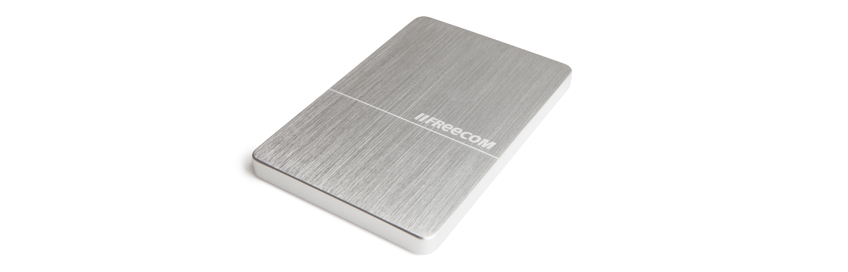
TOUGH DRIVE
320GB - 1TB From 89 €
# 30570, 30971, 56151
buy

A hard nut to crack
Back up your important files with the strongest mobile drive there is: Freecom’s Tough Drive. Rely on the Tough Drive and take it with you when you’re on the road. Protected from inside out – your files are password protected and the drive is tough enough to survive those daily bumps and drops.

Just drop it
Just drop Freecom’s Tough Drive; it survives a drop from up to two meters. Thanks to the internal anti-shock mechanism, your files are safe and always super secured. The ruggedness of this drive is legendary and has been recognised and awarded many times by leading international computer magazines such as Chip, Computer!Totaal, C’T.

Where’s my USB cable?
Have you ever forgotten your USB cable and been unable to connect your hard drive? This will never happen to you again thanks to the Tough Drive’s unique integrated USB cable. Connect your Tough Drive to every computer, notebook or netbook wherever you are.

USB Recording – what is it?
The last few years more and more TV’s are equipped with one or more USB port(s). We have already grown accustomed to playing back photos and movies from a USB hard drive or USB stick on the TV. Now an additional USB feature has been added to TV sets – USB Recording. If you have recently bought a new TV there is good chance that it will support USB Recording, in particular when you have bought a mid range or high end TV.
USB Recording enables you to record programmes to an external storage device directly connected to your TV via USB. Your external HDD basically acts as a videorecorder. You can also use it to pause live TV.
Please note: Only European TVs have USB recording. US models have the feature disabled due to legal issues.
With USB Recording, your external USB hard drive becomes the replacement of your HDD/DVD recorder or even your VHS videorecorders.
What do you need?
First of all you need to check if your TV supports USB recording.
> View compatibility list (PDF)
Setting up USB Recording on your TV
Once you have connected your external USB hard drive to the USB recording port of your TV you can move on to initializing the USB HDD with the TV.
1. Connect the USB HDD to a free USB port on the back of the TV.
2. The USB hard drive now needs to be formatted by the TV, meaning that all current data (if any) on the hard drive will be deleted. Most TVs will recognize that there is a USB HDD inserted and will prompt you to format the USB HDD automatically, but on some models you need to enter the menu and select “format HDD” (or something similar).
3. The HDD will be formatted in a proprietary format. Next to this, the HDD will be linked to this particular TV. You therefore cannot record a TV programme on one TV, disconnect the HDD and try to watch the programme on another TV or on a computer.
4. Most TV’s allow a maximum of 8 different USB HDD’s to be initialized on that particular TV set
5. To record a programme, simply press the <record> button on your remote control (it will then record the channel you are watching), or use the timer function (in combination with your Electronic Programming Guide) to schedule recording a future programme – this works on most TV’s even when the TV is off. To pause Live TV, press the <pause> button on your remote control. Please refer to your TV’s user manual for more details.
PRODUCT SPECIFICATIONS FREECOM TOUGH DRIVE:
CAPACITY: 320GB, 500GB, 1TB
INTERFACE: USB 2.0, can also be connected to USB 1.1 port
HARD DRIVE TYPE: 2.5” SATA, low noise, low power consumption
DATA TRANSFER SPEED: up to 480Mbit/s (USB 2.0)
WEIGHT: 200g / 7.05 Ounce
DIMENSIONS: 140 x 80 x 19 mm / 5.5 x 3.15 x 0.74 inch
MTBF: 50000 P.O.H.
SHOCK RESISTANT: Operating 300G, non-operating 1000G
MAX. DROP HEIGHT: 2 Metres free drop on flat surface
CONNECTOR: Integrated, flat USB 2.0 compatible connector
POWER REQUIREMENTS: USB powered, no adapters needed*
ENVIRONMENTAL SPECIFICATIONS: Operating temperature: 10º C / 35º C, Storage temperature: -20º C / 70º C
MINIMUM SYSTEM REQUIREMENTS:
PC: Intel Pentium III / AMD Duron 900 MHz or higher, 256MB RAM (Vista: 512MB RAM)
or higher, CD-ROM drive, available USB 2.0 or USB 1.1 port, Windows 2000 / XP / Vista / 7 /8
MAC: PowerPC G3/G4/G5, Power Book G3/G4 or Intel Mac, 256MB RAM or higher,
CD-ROM drive, available USB 2.0 or USB 1.1 port, Mac OS X v10.3 or higher
PACKAGE INCLUDES:
• Tough Drive 2.5” mobile external hard drive
• Integrated USB cable
• USB extension cable
• Quick Install Guide
• 2 years manufacturers warranty and unlimited helpdesk support
datasheet_toughdrive_de.pdf
(1.87MB)
datasheet_toughdrive_en.pdf
(1.91MB)
datasheet_toughdrive_es.pdf
(1.91MB)
datasheet_toughdrive_fr.pdf
(1.92MB)
datasheet_toughdrive_cns.pdf
(966.92KB)
datasheet_toughdrive_cnt.pdf
(923.18KB)